
H2 Math – Vector Made Easy by Dr Loo
The H2 Math Vector Calculator by Dr Loo is a practical mathematics app designed to help students work with vectors, lines, planes and 3D coordinate geometry. It provides calculators for common vector and geometry problems, together with exact answers and step-by-step working that students can use to check their calculations and understand the mathematical process, which complement to my Singapore H2 math tuition class.
For students studying Singapore A-Level H2 Mathematics, vectors can be one of the topics where a small algebraic or arithmetic error can affect the entire solution. A calculator that shows the working can therefore be useful as a revision and answer-checking tool.
The H2 Math Vector app includes tools for calculations involving lines, planes, angles, intersections, perpendicular feet, shortest distances and reflections. The app is currently available on Google Play. Download H2 Math Vector on Google Play.
What Is the H2 Math Vector Calculator App?
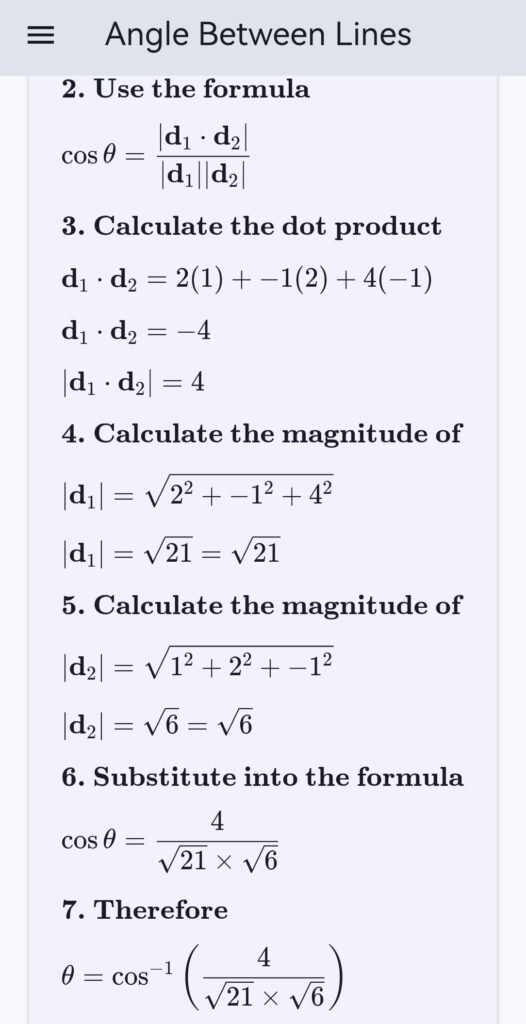
The H2 Math Vector Calculator is an educational mathematics app created to support students who are learning vectors and 3D coordinate geometry. Rather than providing only a final numerical answer, the app is designed to show the mathematical working behind the calculation.
This makes the app useful in situations where a student has completed a vector question by hand and wants to check whether the method and final answer are correct.
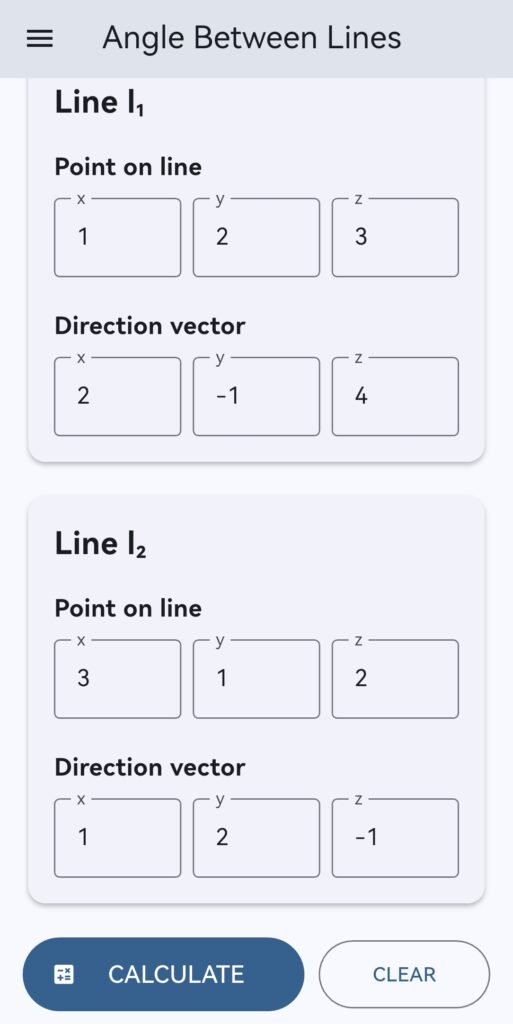
For example, students may enter information about two lines and calculate the angle between them. They can also work with planes, intersections, perpendicular projections, shortest distances and reflections.
The app is therefore intended as a calculation and revision aid. It should be used alongside textbook exercises, school notes, teacher explanations and examination practice rather than as a replacement for learning the underlying mathematics.
Who Can Use the H2 Math Vector Calculator?
The app is particularly relevant to students studying advanced mathematics where vectors and three-dimensional geometry form part of their syllabus.
- JC H2 Mathematics Students
Singapore JC students studying H2 Mathematics can use the app when revising vector-related questions. It can be useful when checking answers after attempting questions from school worksheets, revision exercises or examination papers.
If you are looking for more structured support for Singapore A-Level Mathematics, you can also visit my JC H2 Math Tuition class page.
- Students Revising Vectors
Vectors require students to work carefully with components, equations of lines, equations of planes, scalar products and geometric relationships. The calculator can help students verify the results of these calculations while revising.
- Students Checking Working
When preparing for examinations, students often need to identify where an error occurred rather than simply knowing that the final answer is wrong. Step-by-step calculations can make it easier to compare the calculator output with handwritten working.
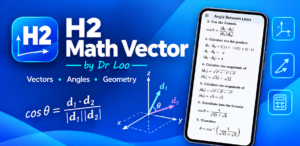
H2 Math Vector Calculator Features
The app contains a collection of calculators covering common vector, line and plane calculations.
- Angle Between Two Lines
The angle between two lines can be determined from their direction vectors. The calculator helps students work through the calculation and obtain the corresponding angle.
This can be useful when checking questions involving the angle between two lines in three-dimensional space.
- Intersection of Two Lines
Finding whether two lines intersect and determining their point of intersection involves solving equations involving the line parameters. The app provides a dedicated calculation tool for this type of problem.
Students can use the result to compare against their own algebraic solution and identify errors in parameter substitution or simultaneous equations.
- Foot of the Perpendicular from a Point to a Line
Questions involving the perpendicular projection of a point onto a line are common applications of vector methods. The app includes a calculator for finding the foot of the perpendicular.
This can be especially helpful when students want to check the coordinates of the projected point after completing the calculation by hand.
- Foot of the Perpendicular from a Point to a Line
The calculator helps students find the foot of the perpendicular from a point to a line. This can be useful when checking the coordinates of the projected point after completing the calculation by hand.
- Shortest Distance Between a Point and a Line
The shortest distance from a point to a line occurs along the perpendicular direction. The calculator can help students verify the resulting distance and the intermediate calculation.
Students should still understand why the perpendicular produces the shortest distance rather than relying only on the numerical result.
- Foot of the Perpendicular from a Point to a Plane
The app also includes calculations involving the perpendicular projection of a point onto a plane. This provides a useful way to check three-dimensional coordinate geometry questions involving plane equations and normal vectors.
- Shortest Distance Between a Point and a Plane
Students can use the calculator to check the shortest distance from a point to a plane. The result can then be compared with the student’s own vector or coordinate geometry solution.
- Angle Between a Line and a Plane
Line-plane angle questions require students to understand the relationship between the direction vector of a line and the normal vector of a plane. The calculator can be used to verify the resulting angle.
- Perpendicular Line to a Plane
The app includes a calculator for constructing or checking a line perpendicular to a plane. This is useful for revision of questions involving plane normals and perpendicular directions.
- Intersection of a Line and a Plane
Students can also calculate the intersection between a line and a plane. This can help when checking parameter substitution and coordinate calculations in three-dimensional geometry questions.
- Angle Between Two Planes
The angle between two planes can be related to the angle between their normal vectors. The app provides a calculation tool that students can use to check this type of question.
- Distance Between Two Parallel Planes
For questions involving two parallel planes, the app can be used to calculate the distance between the planes. This gives students another way to verify their own solution.
Why Use a Vector Calculator for H2 Math Revision?
Vector questions can involve several stages of algebraic manipulation. A mistake in one step can lead to an incorrect final answer even when the overall method is understood.
A calculator that displays the working can therefore be useful for answer checking.
- Check Your Final Answer
After solving a question manually, students can enter the same information into the app and compare the result. If the answers differ, students can review the working rather than immediately assuming that the calculator is correct.
- Identify Calculation Errors
Some vector problems involve several substitutions and calculations. Step-by-step output can help students identify whether an error occurred when calculating a dot product, substituting coordinates, solving for a parameter or simplifying an expression.
- Understand the Calculation Process
A final numerical answer alone does not explain how the answer was obtained. The app provides step-by-step working so that students can compare the calculation process with their own solution.
- Support Independent Revision
Students can use the app while working independently through revision exercises. It can act as a supplementary checking tool when a teacher or tutor is not immediately available.

About the Author/Developer - Dr Loo
I am a PhD holder with 14 years of teaching experience at secondary school and university. My expertizes are mathematics, statistics, econometrics, finance and machine learning.
Currently I do provide consultation and private tuition in Singapore. For those who are looking for math tutor in Singapore or statistics tutor in Singapore, please feel free to contact me at +65-85483705 (Whatsapp).
Some of the math tuition in Singapore I provide includes secondary G2/G3 math tuition and also JC Math Tuition (H1 Math Tuition & H2 Math Tuition). On the other hand, my statistics tuition in Singapore mostly focus on pre-university level until postgraduate level.
For other math tutors and school teachers
If you are interested to use my app to teach you students, feel free to contact me for more discussion
How to Use the H2 Math Vector Calculator Effectively
The most useful way to use a mathematics calculator is to attempt the problem yourself first.
Step 1: Read the Question Carefully
Identify what the question is asking. Determine whether you need to calculate an angle, distance, intersection, perpendicular projection, reflection or another geometric quantity.
Step 2: Solve the Question by Hand
Write down the relevant formula or vector relationship and attempt the calculation yourself. This is important because the purpose of the app is to support learning rather than replace mathematical reasoning.
Step 3: Enter the Required Values
Enter the coordinates, vectors, line equations or plane information required by the relevant calculator.
Step 4: Compare the Working
Compare your handwritten working with the calculation shown by the app. Look for differences in signs, substitutions, vector components, parameter values or simplification.
Step 5: Understand the Error
If your answer differs from the app, do not simply copy the app’s answer. Instead, identify the step where the two calculations first become different. This is where the calculator becomes more useful as a learning tool.
H2 Math Vectors: Topics Students Should Understand
A vector calculator can help with calculations, but students should also understand the mathematical concepts behind the calculations.
Direction Vectors
A direction vector describes the direction of a line. Students should understand how direction vectors are obtained from line equations and how they are used when comparing two lines.
Scalar Product
The scalar product, or dot product, is important when calculating angles and determining perpendicular relationships. Understanding the geometric meaning of the scalar product is essential for solving vector problems correctly.
Equations of Lines
Students should be comfortable working with vector equations of lines and interpreting the parameter used in the equation.
Equations of Planes
Plane equations are another important component of three-dimensional coordinate geometry. Students should understand the role of the normal vector and how a point can be substituted into a plane equation.
Perpendicular Relationships
Many shortest-distance, foot-of-perpendicular and reflection problems depend on perpendicular relationships. Understanding why two vectors are perpendicular is more important than simply obtaining a numerical result.
Using the App Together With H2 Math Tuition
A calculator can be useful for checking mathematical work, while tuition provides an opportunity to discuss concepts, methods and mistakes in greater depth.
For students who need structured support with Singapore A-Level Mathematics, I provide JC H2 Math Tuition, including H2 Mathematics tuition and examination revision support.
My broader Math Tutor Singapore website also contains information about mathematics tuition for different levels and syllabuses.
Students studying other international mathematics programmes can also explore my IB Math Tuition Singapore page for information about IB Mathematics support.
H2 Math Vector Calculator for Answer Checking
The H2 Math Vector app is designed around a simple idea: students should be able to check their mathematical work and understand where a result comes from.
Instead of using a calculator only to obtain a final number, students can compare the displayed working with their own solution. This is particularly useful for vector problems where several stages of calculation are involved.
For example, a student may calculate the angle between two lines by finding their direction vectors, applying the scalar product formula and simplifying the resulting expression. If the final answer does not match, the step-by-step calculation can help the student determine which stage needs to be reviewed.
The same approach can be applied to line-plane intersections, perpendicular projections, shortest-distance problems and reflections.
Download the H2 Math Vector Calculator App
The H2 Math Vector Calculator by Dr Loo is available on Google Play for students who want a practical tool for checking vector and 3D geometry calculations.
The app currently provides a collection of vector, line and plane calculators, including tools for angles, intersections, perpendicular feet, shortest distances and reflections. The Google Play listing also describes the app as providing exact answers and step-by-step working. View H2 Math Vector on Google Play.
If you are studying H2 Mathematics and want to use the app as part of your revision, try solving the question yourself first, then use the calculator to check your working.
Frequently Asked Questions About the H2 Math Vector App
What is the H2 Math Vector Calculator?
The H2 Math Vector Calculator is an educational app containing calculators for vectors, lines, planes and 3D coordinate geometry. It provides results together with step-by-step working for supported calculations.
Is the app useful for H2 Mathematics students?
Yes. The app is particularly relevant to students revising vector and three-dimensional geometry calculations. It can be used to check answers after students have attempted questions themselves.
What can the H2 Math Vector app calculate?
The app includes tools for calculations involving angles between lines, line intersections, perpendicular feet, shortest distances, reflections, line-plane intersections, angles involving planes and other vector and coordinate geometry calculations.
Does the app show the working?
Yes. The app is designed to provide exact answers and step-by-step working rather than displaying only a final result.
Can the app replace learning H2 Mathematics?
No. The app is intended as a calculation and revision aid. Students should still learn the underlying vector concepts, practise questions and understand why each mathematical method works.
Where can I download the H2 Math Vector Calculator?
The app is available through Google Play. You can download or view H2 Math Vector on Google Play.
Start Using H2 Math Vector for Your H2 Math Exam Revision
Vectors and three-dimensional geometry become much easier to revise when students combine conceptual understanding with regular practice and careful answer checking.
The H2 Math Vector Calculator by Dr Loo provides a convenient way to check calculations involving vectors, lines and planes while reviewing the mathematical steps behind the answer.
For students preparing for Singapore A-Level Mathematics, the app can be used alongside school materials, examination questions and H2 Math tuition to support a more structured revision process.